 NeoSCAD
For AI agents
An OpenSCAD MCP server for your AI agent.
neoscad mcp lets Claude Code, Cursor or any MCP agent
write OpenSCAD models and check its own work: errors with fixes,
exact dimensions, a printability check, and a picture of the model
it can look at. It runs on your computer, on your
.scad files and libraries.
Install neoscad, the command-line tool; the MCP server is part of it.
Linux
curl -LsSf https://neoscad.org/install.sh | sh
brew install neoscad/tap/neoscad
.deb, .rpm and more on the Download page
Windows
scoop bucket add neoscad https://github.com/neoscad/scoop-bucket
scoop install neoscad
MSIs and more on the Download page
In the browser
Connect your AI agent at neoscad.org/try lets your agent work on the model open in that page. The agent still runs neoscad on a desktop computer, so install it there first (macOS, Linux or Windows, above) and add the server with --browser: In your browser has the steps. Phones can't connect.
Then add the server to Claude Code, in your project (Cursor, VS Code and other clients: Setup):
claude mcp add neoscad -- neoscad mcpEverything on this page is in NeoSCAD 0.2.1, the current release. NeoSCAD is an independent project, not affiliated with the OpenSCAD project.
The MCP server
Eight tools, one model at a time
neoscad mcp serves NeoSCAD's tools over the
Model Context Protocol
on stdio. It keeps one warm session, with the same caches as
neoscad serve, so a small edit re-renders quickly.
Each tool takes a model as path (a .scad
file) or source (OpenSCAD text), so an agent can try
ideas without writing files.
| Tool | What it answers |
|---|---|
evaluate | Errors and warnings with fix hints, and echo() output, without building geometry: the fastest check after an edit. |
render | Builds the geometry: bounding box, volume, area, whether it is manifold, and how many pieces. export writes it to a file (STL, 3MF, OBJ, OFF, SVG, DXF or PNG). |
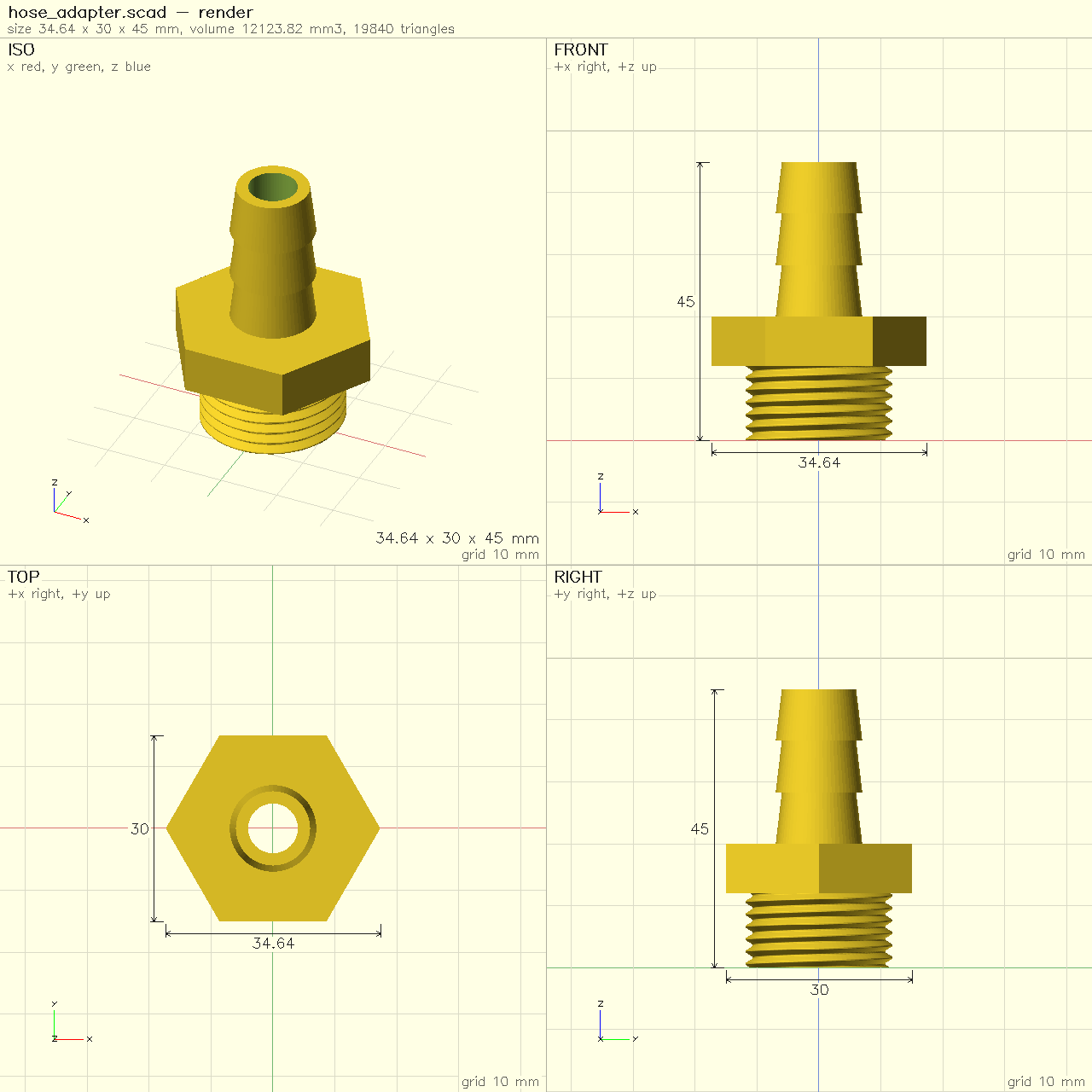
snapshot | A picture of the model: iso, front, top and right views on a millimetre grid, as an image the agent sees, with dimensions, findings or a diff against another version if asked. |
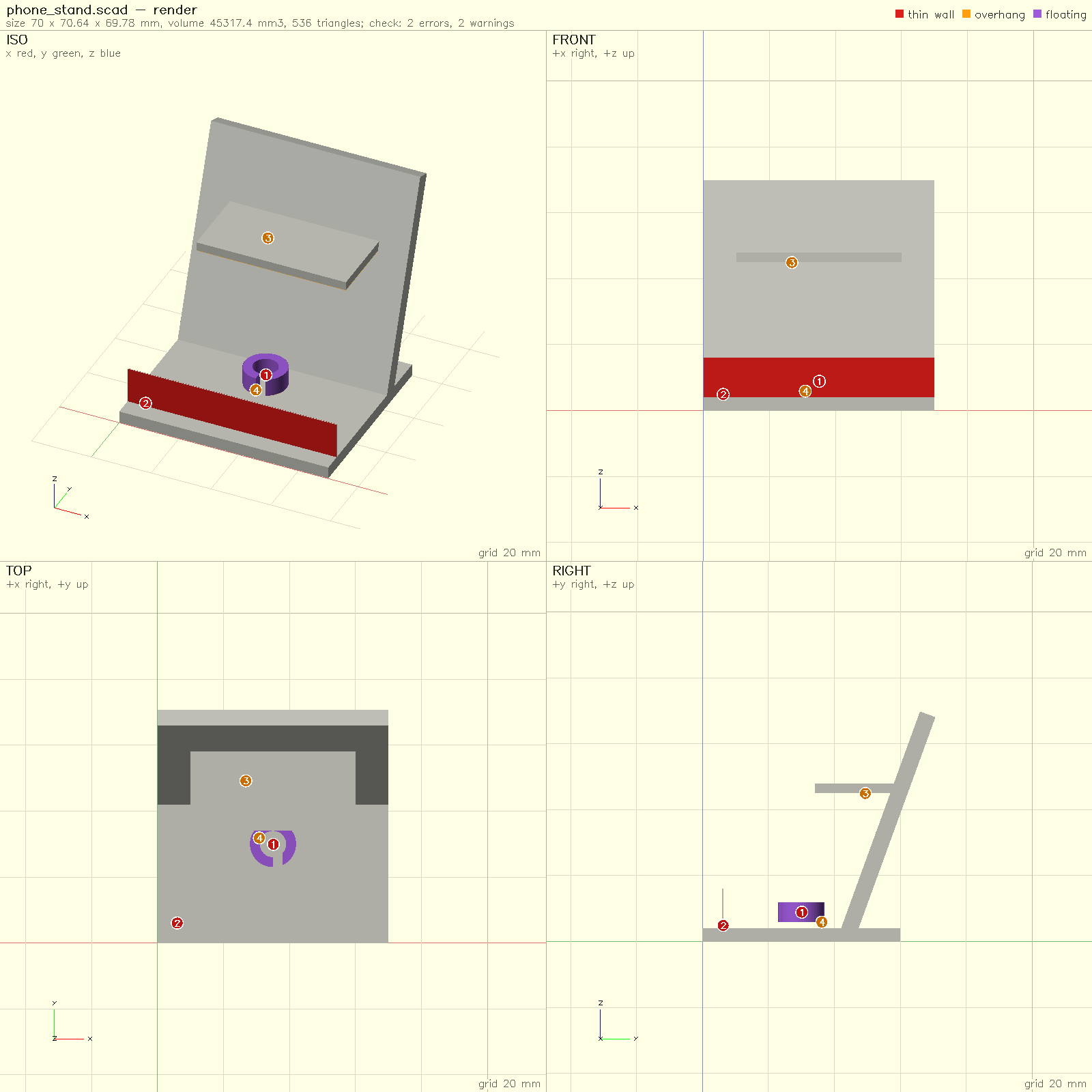
check | A 3D-printing check: manifold, thin walls, overhangs, floating or tiny pieces, bed fit and intersecting parts, each finding with where it is and how to fix it. |
measure | Exact numbers: bounding box, volume and centre of mass of the model and its parts, the distance between two parts, cross-sections and radius profiles. |
test | Runs model tests: module test_*() in *_test.scad files, checked by // @expect lines (volume, bounding box, manifold, a clean check). |
format | Formats OpenSCAD; only whitespace changes. |
docs | The reference for a builtin (cube, rotate_extrude, $fn …) or a library module; with path, a file's definitions. |
With --browser, eight more tools work on the page you
have open in your browser (below). The full
reference, with every argument, is
docs/mcp.md.
Setup
Add it to your agent
First install neoscad, the command-line tool, for macOS,
Linux or Windows: see downloads. The MCP
server is part of it. Then add it to your agent.
Claude Code
In a terminal, in your project:
claude mcp add neoscad -- neoscad mcp
claude mcp list then shows neoscad as
connected. Add -s user after add to have
it in every project.
Cursor
In .cursor/mcp.json in your project, or
~/.cursor/mcp.json for all of them:
{
  "mcpServers": {
    "neoscad": {
      "command": "neoscad",
      "args": ["mcp"]
    }
  }
}
VS Code
In .vscode/mcp.json:
{
  "servers": {
    "neoscad": {
      "type": "stdio",
      "command": "neoscad",
      "args": ["mcp"]
    }
  }
}
Other MCP clients
Run neoscad mcp as a stdio server. Most clients take
this shape:
{
  "mcpServers": {
    "neoscad": {
      "command": "neoscad",
      "args": ["mcp"]
    }
  }
}
If the client cannot start neoscad, give its full path as
the command (which neoscad prints it). The server reads and
writes in its working directory; add "--root", "DIR" to the
arguments for another folder of models. Your library path
(OPENSCADPATH, where BOSL2 lives) is readable too.
The loop
Write, check, measure, look, export
An agent writing OpenSCAD without tools is guessing: it can't see
that a hole missed the wall or that a part floats. With
neoscad mcp it works the way you would:
- Write the model as OpenSCAD, passed as
sourcewhile it iterates. - Evaluate it: syntax errors and unknown modules come back with their line and a hint (did you mean 'cube'?).
- Check it for printing with your nozzle, minimum wall and bed size.
- Measure what the request specified: a hole's diameter in a cross-section, the gap between two parts.
- Snapshot it when the shape is in doubt, and look.
- Export with
render'sexport, and write the.scadfile.
Every result is a short text summary plus the same facts as structured JSON, so the agent reads numbers, not prose. A model that fails says why; a call that couldn't run says how to fix the call. The server tells the agent, once, which tool to use when.
It is OpenSCAD's language, so the agent's model is an ordinary
.scad file: open it in OpenSCAD, in the NeoSCAD app or
in your browser, and change it yourself.
With --enable part on the command line, or
parts: true in a call, part("name") { … }
names a piece of the model, so check and
measure report on it by name and
measure gives the distance between two parts.
What the agent sees
A dimensioned picture, and a printability report
snapshot draws the model's standard views on one sheet,
on a millimetre grid with the bounding box's dimensions, and returns
it as an image the agent reads. With issues it paints the
check's findings on: thin walls red, overhangs amber, floating pieces
purple, with a numbered marker at each one. With
diff_against it shows what an edit added and removed.
check renders the model and reports what would go wrong
on an FDM printer, each finding with where it is and how to fix it:
#2 error thin-wall: a wall 0.3 mm thick, thinner than
the 0.4 mm nozzle … Fix: thicken it to at least 1.2 mm
(3 perimeters of a 0.4 mm nozzle), or remove it
It looks for a solid that isn't manifold, pieces floating above the bed, walls thinner than the nozzle or your minimum, overhangs steeper than your limit, parts that intersect, and a model that doesn't fit your bed.
Safety
Limits for runaway models
An agent will sooner or later ask for sphere(10, $fn=100000).
Every call of neoscad mcp runs under resource limits, so a
model like that fails at once with an error that names the limit and
how to raise it, instead of filling your machine's memory.
| Limit | Default |
|---|---|
time | 60 s per call |
memory | 4 GiB |
fragments, slices | 10,000 per primitive or extrusion |
list, rands | 10 million elements |
string | 64 MiB |
triangles | 10 million per result |
Change one with neoscad mcp --limit fragments=50000, or
=off. The command line takes the same
--limit flags; like OpenSCAD, it sets no limits unless asked.
Files
What it may touch
- It reads and writes only in its working directory and the folders
given with
--root; library and font folders are readable. A model'sincludeorimport()can't reach outside them either. - It writes only when asked:
render'sexport,snapshot'soutput, andformaton a file. An export never replaces a file of another type, such as your.scad, and replaces one of its own type only withoverwrite. - The tools evaluate OpenSCAD, which has no network access and runs no commands.
Scripts and CI
The same answers as JSON, from the command line
The tools have command-line counterparts, and --format json prints
one JSON object describing the run, for scripts, CI jobs and agents
that would rather use a shell:
neoscad check part.scad --nozzle 0.4 --min-wall 1.2 \
  --format json
neoscad measure part.scad --format json
neoscad snapshot part.scad --dims -o part.png
neoscad part.scad -o part.stl --format json
neoscad serve keeps a model's caches warm and answers
JSON-RPC requests, which is what neoscad mcp uses
inside. neoscad lsp gives editors diagnostics and
completion, and neoscad test runs model tests.
The JSON schema is docs/cli-json.md.
In your browser
Connect your AI agent to the page you have open
OpenSCAD in your browser at neoscad.org/try has a Connect your AI agent button. Your agent then works on the model open in that page while you watch: it reads and edits the editor's text, sees the 3D view as you see it, and points at things in it.
- Add the server with
--browser:
(orclaude mcp add neoscad -- neoscad mcp --browser"args": ["mcp", "--browser"]in a JSON config). - Ask your agent to connect to my NeoSCAD page. It gives you a link: open it, or paste it into the page's dialog.
- Ask for changes. Each edit is one undo step, highlighted in the editor; Ask me before applying makes each one wait for your Apply.
Once a page is connected, the model tools work on its text when the
agent gives them no file, and these tools act on the page:
browser_connect, editor_read,
editor_edit, editor_reveal,
view_camera, view_capture,
view_annotate and console_read.
How it connects, and what stays local
- The page is static. The bridge is the
neoscad mcpprocess your agent already runs, listening on127.0.0.1only, so the connection never leaves your computer. - The link carries a random 128-bit key in its fragment, which browsers never send to a server; the page takes it out of the address bar at once. Only the neoscad.org page with that key may connect.
- If the browser won't let the page reach
127.0.0.1directly (Chrome asks you first, and WebKit, Safari's engine, blocks it), the dialog offers a small connection window, which must stay open while the agent works. - Your model stays in the page; NeoSCAD sends it nowhere. What your agent passes to its own model provider is up to the agent.
- It needs
neoscadon a desktop computer: phones can't connect.
The design and its security model are in docs/agent-bridge.md.
An example
From a request to an STL
Say you ask:
Make an open-top box, 60 × 40 × 30 mm outside with 2 mm walls, to print with a 0.4 mm nozzle. Save it as box.stl.
An agent with neoscad mcp might write:
// An open-top box: 60 x 40 x 30 mm outside, 2 mm walls.
size = [60, 40, 30];
wall = 2;

difference() {
  cube(size);
  translate([wall, wall, wall])
    cube(size - [2 * wall, 2 * wall, 0]);
}and then call:
evaluatewith the source:ok, no errors or warnings.checkwithnozzle: 0.4,min_wall: 1.2and its bed size:manifold, 1 component, bbox 60 x 40 x 30, thinnest wall about 2 mm (sampled) — printable: no findings.measurewith a section atz=15: an outline of 2400 mm² and a hole of 2016 mm² (56 × 36 mm), so the walls are 2 mm all round.snapshotwithdims, to look at it: four views with 60, 40 and 30 mm marked.renderwithexport: "box.stl":volume 15552 mm³, manifold, 1 component; wrote box.stl. It writesbox.scadbeside it.
Had a wall come out at 0.3 mm, or the inner cube not reached the top,
check or the snapshot would have shown it, and the agent
would fix the model before you saw it.
Questions
Is there an MCP server for OpenSCAD?
NeoSCAD, a new implementation of the OpenSCAD language, has one built
in: neoscad mcp. It runs your .scad files and
libraries such as BOSL2 and MCAD, and gives an agent tools to evaluate,
render, check, measure and snapshot a model. It is not part of
OpenSCAD itself, and NeoSCAD is not affiliated with the OpenSCAD
project.
Can Claude Code write OpenSCAD models?
Yes. Add the server with
claude mcp add neoscad -- neoscad mcp and ask for a part.
Claude Code writes the OpenSCAD, and the server's tools let it check
its own work: errors and warnings, dimensions, printability, and a
picture of the model, before it writes the file.
Does it work with Cursor, VS Code or other agents?
Yes. neoscad mcp is a standard MCP server on stdio, so any
MCP client can start it: Cursor and VS Code read it from their
mcp.json files, and other clients from their own
configuration, with neoscad as the command and
mcp as the argument. See Setup.
Can an agent see the model it makes?
Yes. The snapshot tool returns a PNG of the model's
standard views on a millimetre grid, with dimensions if asked, as
image content the agent reads. The measure and
render tools give the exact numbers to go with it, and
check marks what would go wrong in printing.
Does my model or code leave my computer?
Not through NeoSCAD. neoscad mcp runs on your computer and
talks to your agent over stdio, and the browser page connects to it on
127.0.0.1. What your agent sends to its own model provider
is up to the agent.
What does it cost?
Nothing. NeoSCAD is free and open source under GPL-2.0-or-later, OpenSCAD's licence. Your agent may have its own costs.
Next
- Download NeoSCAD for macOS, Linux or Windows.
- Try OpenSCAD in your browser, and connect your agent to it.
- Read NeoSCAD and OpenSCAD: what's the same, and what NeoSCAD adds.
- The MCP server's reference: docs/mcp.md on GitHub.