OpenSCAD's language, rebuilt for speed and for agents.
NeoSCAD runs your .scad files and libraries as they are.
It passes 1,773 of OpenSCAD's in-scope regression tests, and it is
about 3.8× faster than the OpenSCAD nightly (Manifold) on heavy models.
Bring your agent to the model. Claude Code,
Cursor or any MCP agent can edit the model open in your browser, see
the 3D view and point at what it means, while you watch.
NeoSCAD 0.2.1: a command-line tool for macOS, Linux and Windows (x86_64
and ARM), an app for macOS 15 or later (Apple silicon and Intel), and
preview apps for Windows and Linux.
Built on the work of OpenSCAD, whose
test suite is NeoSCAD's specification, and the
Manifold geometry
kernel. Credits.
A BOSL2 herringbone planetary gearbox on a gyroid plinth, rendered
to STL in 1.77 s by NeoSCAD and 5.89 s
by the OpenSCAD nightly 2026.09.23 with --backend=manifold:
full render, best of 3, Apple M4 Pro. The model is
apple/Icon/hero.scad in the NeoSCAD repository.
In numbers
1,773of OpenSCAD's in-scope regression tests pass.
What's in scope?
~3.8×faster than the OpenSCAD nightly (Manifold) on
heavy models; 5.0× geometric mean over 14 models including
startup, on an Apple M4 Pro. Method
~0.25 sAn edit to one part re-renders in about 0.25 s,
in a warm neoscad serve (the planet carrier of the gearbox above;
an edit to its gyroid plinth takes 1.55 s).
3,569BOSL2 example and test files, all giving the
same echo output as the OpenSCAD nightly.
Benchmark
One chart, with its method
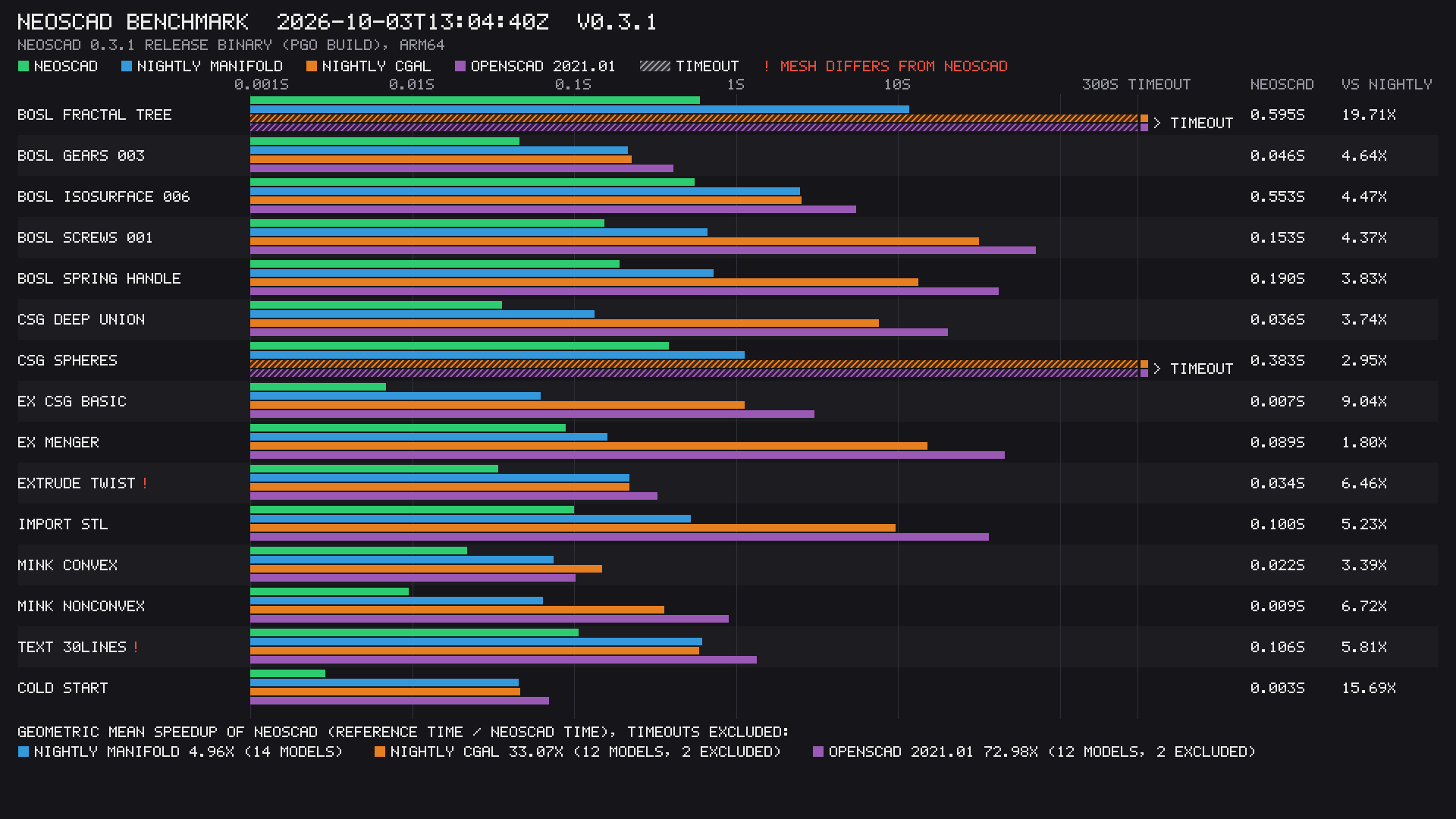
Wall time of -o out.stl for 14 models, including process
startup; best of 3; one Apple M4 Pro (14 cores, 48 GB, macOS 27.0);
the NeoSCAD 0.3.1 release binary against the OpenSCAD nightly 2026.09.23.
The geometric mean is 5.0× against the nightly with Manifold. Nine of
the 14 models finish in under 0.11 s, where startup counts for a lot:
with startup subtracted it is 3.8×, and over the three models that take
longer than 0.3 s, 6.4× (one of them, the BOSL2 fractal tree, is 20×). The nightly's times come from a cache measured
with the same, SHA-pinned binary.
Full table, method and caveats.
What it's for
Three things NeoSCAD is built to do
Your models, unchanged
Open your existing .scad files. NeoSCAD reads OpenSCAD's
language and uses OpenSCAD's own regression tests as its
specification. MCAD and OpenSCAD's default Liberation fonts are
built in, and BOSL2 works from your library path, as it does in
OpenSCAD.
Live editing
neoscad serve keeps a model warm and re-renders only what
an edit changed: about 0.25 s for an edit to the carrier of the gearbox above. The
macOS app is built on the same engine, and
neoscad lsp brings diagnostics and completion to any
editor that speaks the Language Server Protocol.
Built for agents
An MCP server (neoscad mcp), JSON output from every
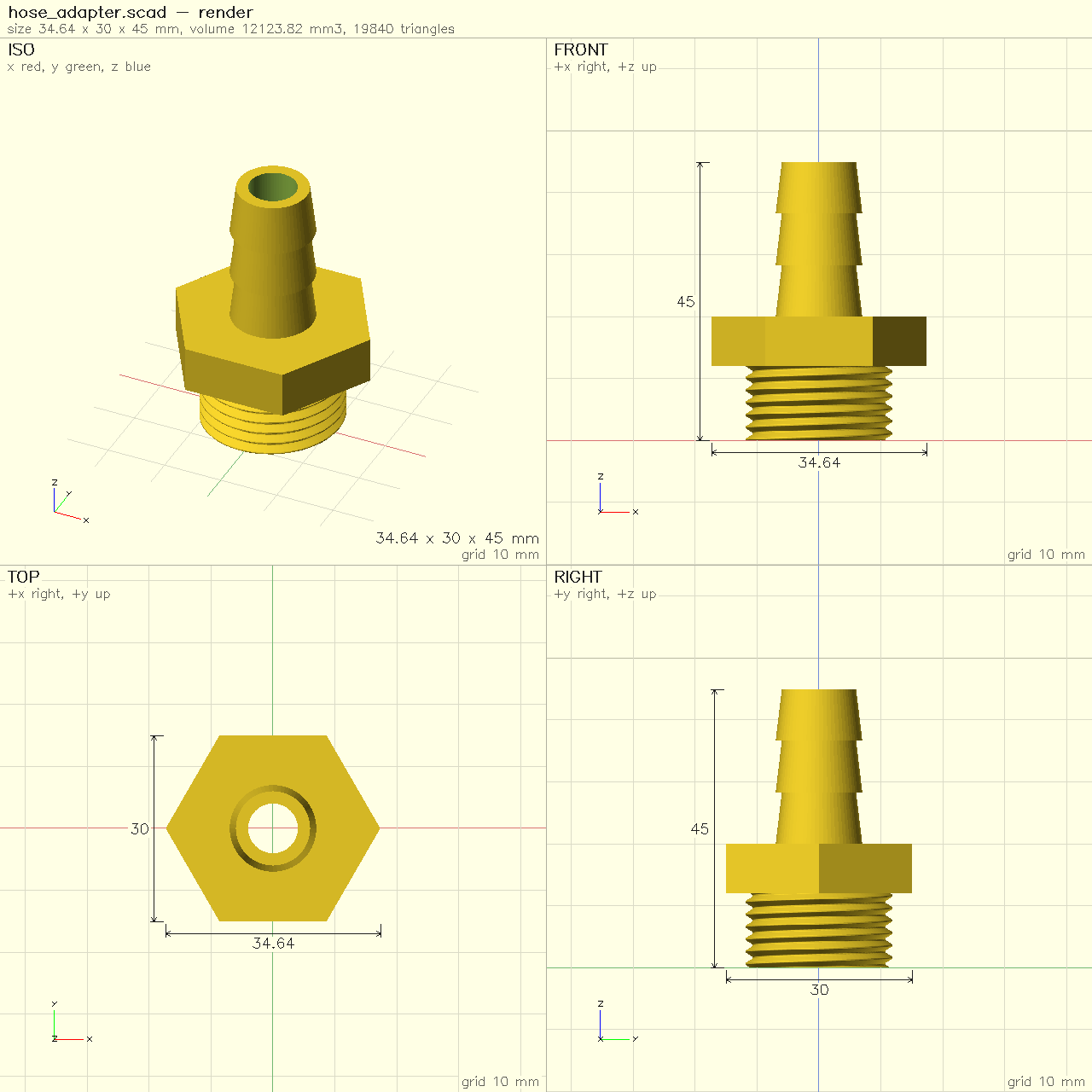
command, and tools an agent can look through: snapshot
renders a dimensioned four-view sheet, measure and
check report sizes and printability. Resource limits stop
a runaway model with an error instead of filling the machine.
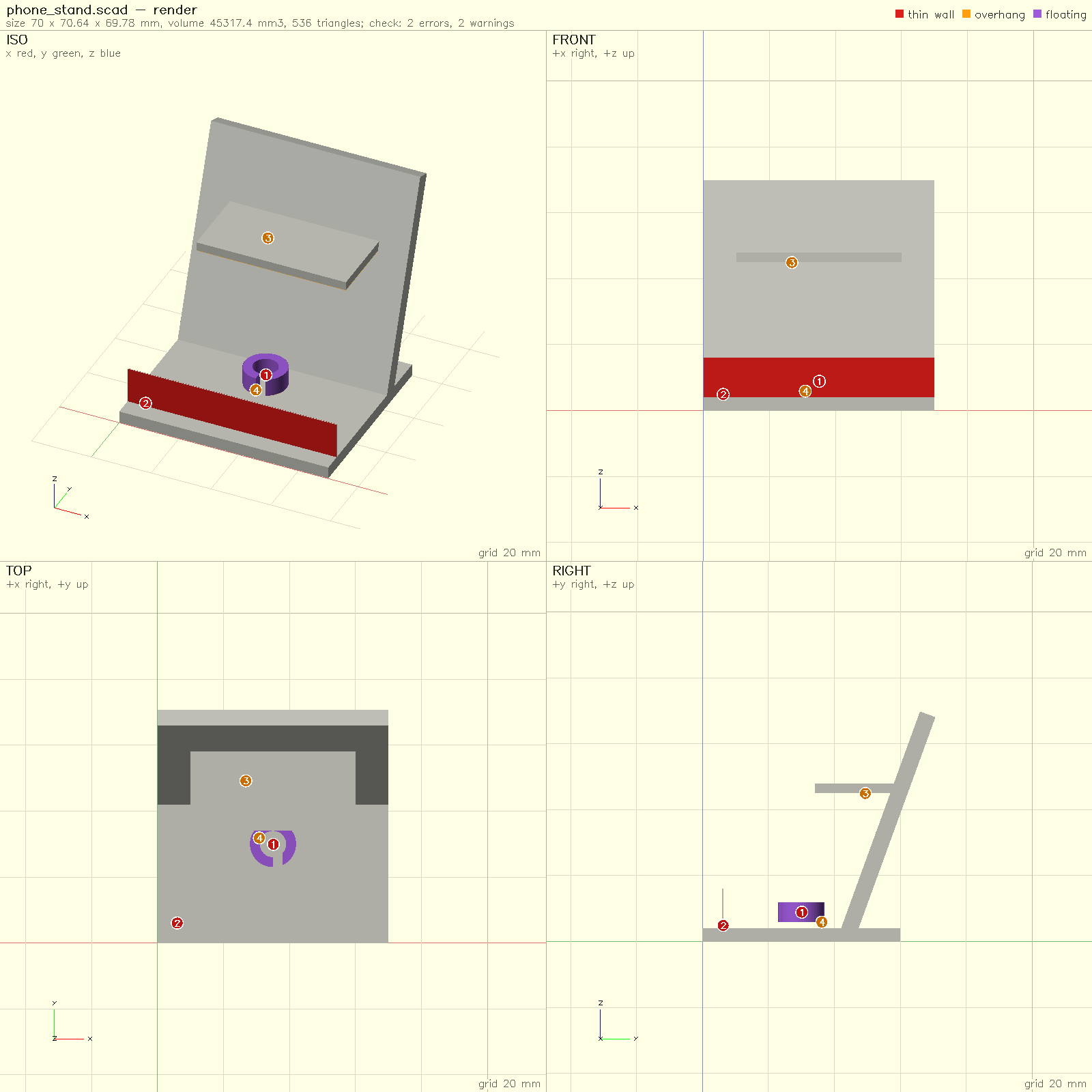
snapshot --issues paints the findings onto the sheet: thin
walls red, overhangs amber, floating pieces purple, with a numbered
marker at each one. Add --format json for machine-readable
output.
neoscad snapshot of a threaded hose-barb adapter: four
views with dimensions, one PNG an agent can read.
neoscad snapshot --issues of a phone stand with three
printing problems: a 0.3 mm lip (red), a floating clip (purple)
and an unsupported shelf (marker 3).
Built in the open
How NeoSCAD was made, and how it's checked
NeoSCAD was written by AI coding agents. Almost all of
its code was written by Anthropic's Claude, working as coding agents
under the direction of one person, who set the plan, reviewed each
change and committed it. The first commit is from 25 September 2026,
and the full history is public, with each change and the tests it
had to pass. Built by Matt Robinson with Claude, supported by
The Ned Workshop.
You shouldn't have to trust it because of who, or what, wrote it, so
its behaviour is checked against OpenSCAD's:
OpenSCAD's regression suite is the specification.
1,773 in-scope tests pass, and a change may not make a passing test fail.
BOSL2: all 3,569 example and test files give the
same echo output as the OpenSCAD nightly, and BOSL2's
own 976 tests pass.
Differential tests compare NeoSCAD's parse tree,
echo and CSG output with the nightly's, and every benchmark model's
mesh with the nightly's (volume, area and bounding box).
Fuzzing: the polygon tessellator was fuzzed
against OpenSCAD's C libtess2, and an evaluator prototype against
the tree-walking evaluator.
Every recorded conformance run, from the first on 26 September 2026:
the grid of OpenSCAD's tests, the commit that ran them, and the pass
count over time. It is generated from the project's run log by
conformance video.
Coming from OpenSCAD
What's the same, and what isn't
The language, the libraries and the command line
(neoscad model.scad -o model.stl) work as you know them.
The differences today:
Geometry uses Manifold only; there is no CGAL backend.
text() uses the bundled Liberation fonts; system fonts aren't found yet.
The macOS app has no Animate panel, and the customizer is partial.
We don't know of a model where it is slower than the nightly, but
we have measured only so many; if you find one, please
open an issue.
The Windows and Linux apps are still previews, though since
0.2.1 they have the macOS app's check, measure and customizer
panels too.
NeoSCAD is an independent project. It is not affiliated with or
endorsed by the OpenSCAD project.
Credits
Standing on OpenSCAD and Manifold
NeoSCAD exists because of OpenSCAD:
its language, its examples and, above all, its regression test suite,
which is NeoSCAD's specification. Thank you to its maintainers and
contributors.
Geometry is Manifold,
by Emmett Lalish and contributors, through Lars Brubaker's Rust port,
manifold-rust.
Manifold is also what makes the OpenSCAD nightly fast.
Also: Clipper2, through Lars Brubaker's
clipper2-rust;
libtess2 (Mikko Mononen's packaging of the SGI GLU tessellator);
BOSL2 by Revar Desmera
and contributors; MCAD; and the Liberation fonts.
Supported by
NeoSCAD is free and open source. If it's useful to you, you can
support its development. Donations go to The Ned Workshop, a
501(c)(3) nonprofit, and are tax-deductible in the US.
Donate
Questions
Why not CadQuery or build123d?
They're good tools. They are Python libraries on a B-rep kernel, so they
give you fillets on real edges and STEP output, which NeoSCAD, a mesh
modeller like OpenSCAD, does not. NeoSCAD is for people and agents who
already have OpenSCAD models and libraries such as BOSL2, or who want
OpenSCAD's small declarative language and a fast edit-and-see loop.
Is it a drop-in replacement for OpenSCAD?
Not a claim we make. OpenSCAD's suite registers 3,258 tests. In the
latest run 1,773 pass and 1,485 are skipped as out of scope: duplicates
that only run on the CGAL backend (NeoSCAD uses Manifold only),
experimental features, and tests that OpenSCAD itself marks as known
bugs or disabled. The GUI is less complete than the command line.
Is it faster on every model?
On every model we have measured, but not by the same amount. On the
14-model benchmark it is about 3.8× faster than the nightly with
Manifold on the heavy models, and 5.0× as a geometric mean including
startup; the smallest lead is 1.80×, on the Menger sponge. We don't
know of a model where it is slower; if you find one, please
open an issue.
The benchmarks page has every number.
Which platforms does it run on?
The command-line tool runs on macOS, Linux (glibc 2.28 or later) and
Windows, on x86_64 and ARM. The app needs macOS 15 or later, on Apple
silicon or Intel. It also runs as WebAssembly, with nothing to
install: OpenSCAD in your browser. See
downloads.
 NeoSCAD